Our notes on using LLMs for code migration

Even small code changes – renaming functions, swapping libraries, and similar – can trigger a week of stress. It’s the simple processes that somehow always turn into ugly scavenger hunts across tickets and repositories.
Software developers don’t like code migrations; they resemble dentist checkups: mildly scary but necessary. Business decision-makers don’t like them either – legacy migrations are investments you can rarely put on the quarterly scoreboard, even though they’re critical.
If talking about enterprise-grade code migrations, the low-profile, “small changes” stop being small quickly. They cascade through integrations, not-so-obvious dependencies, and other complex tasks until transforming into projects devouring resources.
That’s where LLM assistants are entering the game.
Why use AI for code migration?
Remember when TSB attempted to migrate customer accounts to their new core banking platform in 2018? The transition wasn’t routine — it produced technical failures that left customers locked out of crucial services and created knock-on problems.
In brief:
- What happened: TSB migrated to a new platform and experienced immediate failures
- The impact: 1.9 million customers experienced access issues or outages in the days after
- The bill: the incident has cost TSB hundreds of millions and caused business disruption
- The damage: UK regulators have fined TSB about £48.65 million for failing the migration
TSB became an enterprise-scale cautionary tale: the problem wasn’t just about challenging code dependencies – it was about planning, careful preparation, data mapping, test coverage, and proper third-party governance. The transition could have been successful, but ended up being a disaster.
But can these issues be resolved with automation?
On using AI in code migration: key thoughts on adoption
The infamous TSB incident happened back when migrations were reliant on conventional, fragmented tooling. That landscape has changed – new methods (artificial intelligence and its key subfields) are there and shifting how enterprises now approach rather complex code migrations.
Here’s where we stand with automated code migration in 2025:
- 72% of surveyed companies have used AI tools for coding
- AI tools are the new co-workers:
- 84% of software developers now use or plan to use AI tools in their daily workflow
- 51% of software developers are using AI tools as part of their coding/debugging/testing tasks
- Despite only 17% using AI tooling “at scale”, private investment is soaring
- As by recent reports, LLM-powered workflows are promising huge productivity:
- To automate an average of 70-75% of edits during migration
- To cut the timelines by 30-50%
The paradigm has shifted: business leaders are no longer asking whether modern LLMs belong in projects – they’re figuring out instead whether they can rely on those, and where human supervision remains essential. The question isn’t if they can help avoid another failure, but where LLMs deliver most value within workflows.
What’s changed is not the risk of migration, but rather the level of support IT teams now have navigating it.
Where enterprise code migrations break down
Keeping uptime under pressure
Quite often, code conversion must happen while systems remain accessible to eliminate business disruption. That means that engineers must maintain old and new systems in parallel and coordinate database changes while ensuring zero outage.
Untangling piled technical debt
Another issue, older systems heavily depend on plugins/scripts/extensions built upon outdated technology. This requires the engineers to replace platform-specific logic and features with portable, modern alternatives, which might also mean to introduce standalone services replacing extensions, compatibility layers, and more.
Business logic no one owns anymore
Critical rules are buried in legacy code paths, config files, hard-coded constants, and messy emergency fixes. When teams don’t understand business intent, they risk breaking functionality and struggle meeting standards.
Data risks
Data reshaping, storage & platform changes, and other data-related processes may introduce slow failures. Subtle issues can slip through validation and surface only after user interaction.
Testing that doesn’t reflect the reality
Test environments rarely capture the complexity of systems in production, data patterns, and configurations. Unusual combinations, recovery scenarios, edge cases, timing mismatches, and others oftentimes remain untested until finally escalating after deployment.
Rollbacks that don’t work
Rollback strategies that exist in runbooks but aren’t really actionable make recovery both uncertain and risky. Reversion shortfalls can turn manageable defects into serious business damage.
LLMs introduced to automate code migration
Code migration, in particular enterprise-level projects, is expensive – it combines great demand and pitfalls. Advanced tooling doesn’t eliminate given complexity but redirects the resources, including time and cost, towards creativity, a smarter decision-making process, and governance.
LLM capabilities that move the needle:
- Code-within-context understanding
- Pattern transforms
- Discovery & dependency mapping
- Replay & equivalence checking
And, famously, test generation, done faster and better.
Some tasks LLMs can take over:
Language-level migrations
Code conversion from one programming language to another (for example, Java to Kotlin migration) is tedious. Coding solutions can preserve architectural boundaries in place, flag gaps, analyze and convert parts, and more, thus cutting the extensive manual process.
Language-version migrations (framework upgrades)
Code conversion from older to newer, modern versions (for example, .NET version code moves) are common. Coding assistants can identify syntax-level changes that matter, API mods, and irrelevant, deprecated features, thereby surfacing the things easily overlooked.
Architectural modernization
To break a monolith into services, extract modules, or move to cloud is tricky and requires domain expertise. LLMs help to detect cohesive boundaries, find candidate service extractions, and synthesize initial scaffolding, so engineers can handle creative work, not boilerplate and adjustments.
Legacy modernization and cleanup
To port mainframe applications, remove waste, and improve code observability are complex, high-risk tasks. LLMs replay production inputs, validate outputs, and generate new functionality that match legacy behavior, thereby allowing to balance project speed and safety.
Code migration with advanced AI tooling: a real-world case study
Google’s experience: finishing migrations that stalled for years
Google’s PAs (Product Areas) – Ads, Search, Workspace, YouTube – are enterprise-scale, mature organizations. Decades-old codebases, large repositories, and pressure to deliver without breaking customer expectations – the perfect case study.
In the LLM era, Google split its approach into two main tracks:
- One track is generic developer tooling for use across thousands of engineers
- The other is bespoke product tooling: heavy solutions specifically designed to do repo-wide migrations, test generation, and refactors, where every single interaction is complex and outcome-oriented
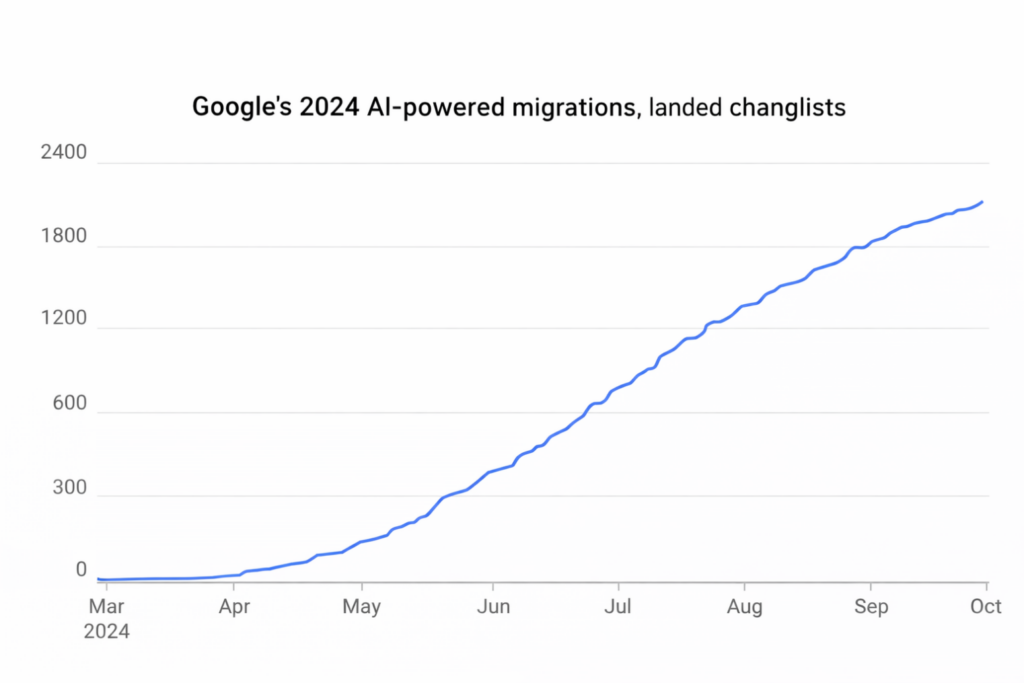
The result: LLMs didn’t just speed the routines – they unlocked the migrations that had been stalled for years. Small teams could complete multi-team efforts that otherwise would’ve consumed inconceivable resources – LLMs handled the repetitive, large-scale edits while engineers could focus on design.
In 2024, their efforts have been heavily focused on automation, with outcomes scaling quarter over quarter:
Google’s conclusions: lessons learned
Google’s experience is telling: LLMs make intractable migrations quite feasible, but require human oversight. When treating code migration as another do-and-forget scramble to manage, no tooling will make a difference; but handling it as a repeatable and important business problem, you might actually build the toolkit you need.
Google’s learnings in brief:
- LLM solutions are accelerants, not replacements: these tools were designed to handle trivial changes; success requires to combine LLMs with AST analysis and heuristics for accuracy and consistency
- Reusable toolkits over one-off, disposable scripts: the patterns are designed for reuse across projects, so why not use that benefit?
- Bespoke solutions will beat general prompts in repo-level, end-to-end migration
- Don’t guess but measure: don’t underestimate input-replay and equivalence checks
Best practices of using AI assistants for smooth code migration
Make migrations easy repeatable and measurable – it’s not your one-off heroic episode, it’s future-proofing. Advanced tooling might multiply your efforts, but only when embedded in disciplined, careful engineering.
So, here’s your playbook:
- Don’t use LLMs alone: LLMs might be powerful, but using deterministic analysis will make them safe
- Make sure to automate from start: LLMs can help build dependency graphs, call-site maps, and more, so engineers always know a change’s blast radius
- Audit trails: you should always log model versions, inputs, prompts, and decisions for compliance
- Test generation: you can ask models to create tests covering every scenario, you know?
- Data access and security: don’t forget, the product is sensitive, in particular during migration
- Control prompts and transforms: version, review, and rollback your prompts and scripts
- Rollback-first approach: design migrations, so that every change is simple to revert
- Safe rollout: minimize trouble by using feature flags, progressive canaries, and similar
- Human review and rollout are critical: humans should still decide on strategy and review edge cases
- Governance, observability, and rollback: add monitoring, clear ownership, and rehearse rollback plans
How we can help
In short: code migrations don’t have to become the scary annual breakdown that drains boardroom oxygen. With the right expertise and tooling (LLMs with AST analysis and heuristics), they become repeatable projects – faster, cheaper, and far less risky.
We don’t sell miracles, we deliver the team that does all the heavy lifting.
Our expertise:
Our services:
FAQ
LLMs minimize manual effort that’s required to analyze and refactor, as well as validate large codebases.
LLMs can:
- Understand code within context, not just isolated snippets
- Map dependencies across modules and services
- Identify deprecated APIs and version conflicts
- Suggest safe code transformations, and more
They don’t replace engineers – they eliminate cognitive overload.
Using generative AI does not remove architectural risk, data challenges, or debt, but simplifies the execution.
It can:
- Partially automate language-level conversions
- Detect changes within syntax and framework
- Migrate boilerplate
- Generate scaffolding
So, basically, it compresses the time that’s spent on mainly mechanical processes.
In an LLM-driven approach, humans still remain accountable, but routines and decision-making are automated. It’s less about rewriting and more about supervising.
In brief, LLMs perform migration through pattern recognition, contextual reasoning, and generation of code. The most advanced implementations also support replay and equivalence checking, which means they validate that code produces outputs that align with the legacy behavior that’s expected.






 CLUTCH