Coding assistants: Abto Software’s AI guide

Part 1: The foundation – on why AI matters
The introduction
Purpose of this guide
To empower our developers by providing clear guidelines for using AI assistants (for example, GitHub Copilot). The objective is boosting overall productivity and innovation by integrating coding assistants into workflows both safely and efficiently.
Our philosophy: AI as a “copilot” to enhance your expertise
We view AI assistants as powerful partner coders that handle routine tasks and support software development. They’re designed to augment your skills, not replace critical judgement and creativity.
Following the cardinal rule
The developer who commits the code is responsible for quality, the performance in production, and security. You are the pilot-in-command.
The scope
This handbook is focused on the officially supported, popular toolset: Visual Studio Code and GitHub Copilot. The principles herein apply to all similar tools.
A whole new paradigm: from coder to architect
The modern AI assistant is reshaping software development and testing: what began as an autocomplete tool has matured into impressive peer programmers generating code, writing tests, suggesting solutions, and more. These tools free developers from performing repetitive work, thereby enabling greater focus on architecture, design, problem-solving, and innovation.
Surveys reveal software developers also use AI tools to learn new languages, best practices, and frameworks. Others highlight productivity gains of over 50% thanks to using AI assistants, which positions AI as a collaborator and tutor.
This transformation is powered by a rich tapestry of features that redefine how code is written and managed.
Key capabilities:
- Code completion and generation: context-aware autocompletion that provides coding suggestions from single refined lines to entire thought-out functions
- Conversational interaction: in-IDE interfaces that allow to ask for advice, explain code, generate tests, and delegate defined tasks to agents for implementation, thus creating an environment for developers to focus on intent while agents handle execution
- Model extensibility: the flexibility to switch between different LLMs within an assistant, or integrate private models to protect proprietary code (at the enterprise level, this means to connect to private LLM deployments, so organizations can harness advanced capabilities while ensuring their code & data remain secure)
Take a look at Appendix A. The evolution of AI-powered code assistants to see the journey of how these tools have grown into powerful coding partners we are seeing today.
As assistants are handling boilerplate and component-level coding, the developer’s value shifts and introduces new roles:
- AI orchestrator: a developer’s work effectiveness now depends on communicating with the AI tool, which requires prompt engineering – the art of asking correct questions and providing right context; the developer must split complex problems into discrete, AI-manageable tasks and fuse the results – the skill of delegation and specification
- System architect: the developer’s primary responsibility becomes designing overarching structures, which involves the definition of architectures, creating clear API contracts, and making key decisions; the developer will create the blueprint, and the AI acts as a construction crew, which requires a strong systems thinking – the ability to see interconnected relationships rather than individual elements
- Quality gatekeeper: AI-generated code might contain subtle bugs, inefficient logic, and vulnerabilities – the developer must have specialized expertise to review this code to validate and approve the output; this requires rigorous verification, making expertise in testing and analysis a top-function
At length, the goal is shifting from being a writer of code to driver of results, from executing to coordinating. It’s no longer about manually typing the code but about intellectual labor of problem-solving, creative thinking, and oversight.
Part 2: The rules of engagement – on using AI safely and efficiently
Critical awareness to understand and mitigate LLM risks
To use LLMs (Large Language Models) both safely and efficiently, it’s essential to understand their limitations. By design, LLMs are probabilistic systems that process natural language more like mathematical expressions, not some reasoning engines that comprehend complex concepts.
The underlying LLM nature is causing specific behaviors and risks that every software developer must manage.
Before diving into specific code-related risks, it’s crucial to grasp these core LLM characteristics:
Probabilistic & stochastic nature
LLMs generate their responses by guessing the likely next word or token through patterns in their training data:
- One prompt can produce different outputs
- This results in the “Swiss cheese” effect of accident causation – the tool can solve complex problems but fail at a simple task (for example, counting words in a given sentence); the assistant can’t reason, just reproduce known patterns
Knowledge cutoff
Every model is limited to its knowledge cutoff – the point in time to which is has been trained on data:
- The model has access to information (books, articles, websites, code) published before the cutoff
- It does not know about events, research, technologies, or updates done after that date
General context
The model doesn’t know anything about your company’s proprietary code, coding standards, or architecture. It’s trained on publicly available data and cannot draw conclusions about any private agreements.
Short-term memory
The model can process a limited text amount at once, which includes both the provided prompt and response. In case the conversation or code are longer, the model will lose its awareness about earlier typed prompts, thereby showing forgetful behavior and inconsistency.
Sycophancy or acquiescence bias
LLM models are trained to help and agree – they’ll try to please the user even when they haven’t the answer. That’s why you should always approach the responses with a cold mind, in particular if uncertain about the premise yourself.
Key risks and how to avoid potential failure
When using AI assistants for coding, common limitations manifest themselves as specific, high-impact risks:
Factual inaccuracies and hallucinations
AI assistants can invent tricky code that appears quite plausible but proves functionally incorrect when tested. That might include calling non-existent functions, for example.
Mitigation strategies:
- Don’t trust, always verify: try treating the code as an unverified suggestion from a junior developer – it’s a starting point, not a finished product
- Remember testing: always write and run unit tests to validate the functionality and handle edge cases
- Cross-reference documentation: official documentation is the ground truth
- Prompt engineering: take a look at Appendix 3
Security vulnerabilities
AI models are trained on publicly available code, which means there’s code with common security deficiencies. Flawed code might reproduce insecure patterns, thus causing SQL injection, Cross-Site Scripting, and more.
Mitigation strategies:
- You’re the security checkpoint: the developer is the final line of defense – you must be ready to apply your knowledge and experience to analyze generated code, especially code that handles user input, cryptographic operations, and authentication
- Security scanning: you should also integrate Static Application Security Testing (SAST tools) into your typical workflow (see the Must-have toolchain section below)
Poor quality and maintainability
The assistant might produce working code that’s inefficient and hard-to-read or violates established patterns. It’ll prioritize overall function over maintenance.
Mitigation strategies:
- Team standards: to enforce stylistic consistency, you can use linters and automated code formatters; for more complex patterns, you can provide instructions that outline your project’s coding conventions and architecture
- Peer review: make sure the reviewer is aware that an AI agent was used to encourages higher scrutiny regarding logic and adherence to established project standards
Copyright issues
The model could copy verbatim snippets from repositories being protected by licenses (GPL, AGPL, and others). That would instantly cause extra issues.
Mitigation strategies:
- Built-in filters: you must make sure you set the assistant’s setting to block suggestions that match public code
- Software Composition Analysis tools: to use SCA tools is the ultimate backstop (see the Must-have toolchain section below)
Must-have toolchain for secure, AI-assisted development
| SAST | SCA | Code quality & linter | |
| Definition | A tool that scans source code for known security vulnerabilities | A tool that scans project dependencies for known security vulnerabilities and issues with compliance | A tool that enforces a consistent coding style and identifies “code smells” |
| Value | It acts as a security reviewer and catches potential vulnerabilities | It suggests potential solutions to ensure project dependencies aren’t vulnerable | It helps to adhere to internal project standards for readability and maintainability |
| Recommended tools | GitHub CodeQL, Snyk Code, or SonarQube | GitHub Dependabot, OWASP Dependency-Check, or Snyk Open Source | ESLint (JavaScript/TypeScript), Pylint (Python), or SonarLint (as an IDE extension) |
Company policy and compliance – balancing innovation and security
| Tier 1: general projects | Tier 2: sensitive projects | Tier 3: highly restricted | |
| Specifics | Default projects, internal tools, and those customer-facing applications without highly sensitive data | Complex projects that handle financial transactions and specific healthcare records (personal identifiable information, protected health information) | Repositories containing intellectual property, encryption algorithms, authentication infrastructure |
| Rule | GitHub Copilot is approved for use, all guidelines in this document apply | GitHub Copilot is approved under conditions, use requires explicit sign-off from the project lead, and the software developers should be extra cautious | GitHub Copilot is forbidden for use, which can be enforced in its organization settings |
Part 3: The playbooks – our practical “how-to” guides
Software developer’s AI playbook
To use AI assistants as efficiently as possible is not just about asking questions – it’s an essential skill to master. The goal is transforming the tool into your pair programmer who’s ready to help.
LLM prompting: the basics
The art of the right prompt
- Context is the king: be sure to explain the why, not just the what
- First, break large tasks into small, chainable subtasks
- Second, use related files (for example, your specific copilot instructions)
- Clarity is your superpower: be specific
- Lazy prompts will generate lazy results (an example to follow: “Generate 5 unit tests in Python using Pytest to check if the built function accurately calculates the classic Fibonacci sequence, and include a test for the zero-th index”
- Before asking for snippets, you can also add a comment or a function signature for anchoring (an example: “When provided a user object array, filter out inactive users and return an array of their email addresses”)
- Don’t fear the dialogue, keep iterating and refining: you prompt is the opening line to conversation, small loops will beat one mega-prompt
- Always question the output: you should always ask for trade-offs and alternatives
Level up your prompting
- Few-shot prompting: provide examples of what you want – by illustrating desired format and style, you guide the assistant to a better output
- Chain-of-thought prompting: ask to “think step-by-step” (this forces the tool to “reason” before giving an answer, which leads to more accurate and logical solutions
The right LLM for the job – the key to success
Not all AI models are created the same – switch between different models to achieve the best possible results. For instance, one model might excel at generating creative snippets, while another is better for debugging.
Many toolsets (for example, GitHub Copilot) are starting to offer a selection of models from which to choose. The choice is important just like picking cars (you would not take an expensive Formula 1 one off-roading).
Your toolkit generally contains three types of models:
- First, so-called “thinking” models that handle the most complex work – they reason through algorithms to design entire systems or debugging tricky logic; they’re slow and resource-heavy, so use them only when facing tough tasks (OpenAI o-model, Anthropic Claude Opus 4, Gemini 2.5 Pro Reasoning)
- Next come the all-rounders – reliable, balanced, and ideal for daily routine work; they’re good with the simple stuff, so use them for boilerplate code, unit tests, as well as documentation (OpenAI GPT-4.1, Google Gemini 2.5 Pro, Anthropic Claude Sonnet 4)
- Finally, the specialist models, lightweight, efficient, and great for doing quick tasks (completing code, fixing syntax, or powering real-time tools); they’re fast, but don’t expect them to solve tough problems
The industry is moving toward unifying AI models and creating one single, powerful model to handle any task. GPT-5 is a big step forward, but that’s about orchestration where one dedicated router can choose the model. A unified AI model will require greater innovation, in particular new breakthroughs in architecture and training. For the foreseeable future, you should remain flexible and experiment to find the model for your specific task.
To note: Abto Software’s software developers state that Anthropic’s models often outperform other assistants in complex, agentic scenarios, in particular when integrated with tools like the GitHub Copilot.
AI assistants in your daily toolkit
AI assistants are the smart tool you need to supercharge common tasks:
- Banish boilerplate: generate boilerplate for components, config files, data structures, and classes
- Generate tests: create comprehensive test suites (be specific about covering edge cases)
- Master debugging: paste any confusing code, error messages, and messy stack traces and ask for fixes or explanations – it’s a fantastic way to understand legacy codebases
- Refactor confidently: for example, ask to refactor functions to be more efficient
- Document quickly: generate docstrings, explain classes, or create README sections for features
- Craft perfect Git commands: analyze new code changes (git diff) and automatically generate clear commit messages and pull request descriptions
- Automate reviews: check for common bugs, security vulnerabilities, and style guideline violations, freeing up human colleagues to focus on high-level project tasks
- Augment tools: automate highly specialized tasks like querying a database or running end-to-end tests with tools like Playwright or Puppeteer (this transforms your assistant into an active agent)
See also:
- Part 4: Advanced concepts to read the explanation of how these tools are integrated
- Appendix C, which demonstrates how tools can help AI agents verify work and achieve WOW results
Your journey to mastery: AI adoption
Most follow a quite predictable path when integrating AI into their work:
- The skeptic: initially hesitant and using the tool rather sparingly
- The explorer: begins experimenting with clear, simple tasks and identifying the tool’s basic strengths and weaknesses
- The collaborator: integrates the AI assistant into their daily workflow and uses as a pair programmer for debugging, test generation, and refactoring
- The strategist: moves beyond personal utilization and focuses on orchestrating AI agents to solve complex problems
See also:
- Appendix C for guidance on getting started with AI code assistants efficiently
- Appendix D, which offers general guidance on the GitHub Copilot’s key features
Tech lead’s AI playbook
To leverage AI across a team or organization, you must also shape your environment to support it accordingly. You have to make your codebase more legible to machines and establish outlined workflows.
“LLM-legible” codebase
You can significantly help the assistant quickly navigate your codebase:
- Code maps: invest in your codebase being discoverable, including indexing call graphs, API schemas, and dependencies – the tool will use this “map” to reason about any cross-cutting concerns
- Documented libraries: for critical internal libraries, create a guide stating the library’s explicit purpose, public APIs, common pitfalls, and invariants – that’s far more reliable than hoping AI will infer it
- Explicit contracts: use only strong types, clear interfaces, and assertions – explicit contracts shrink the “hypothesis space” the model must explore, thereby reducing the chance of generating incorrect code
“Plan, act, verify” loop
You can strategically steer the team from using the assistant for one-shots to making iterative loops:
- Test-first generation: encourage having the tool write or extend tests before writing final code
- Integrated analysis: the assistant shouldn’t just write code; it should be able to use existing tooling – integrate analysis, type checkers, and linters into the AI workflow, so it can drop bad ideas before they ever become pull requests
- Human-in-the-loop gates: code reviews are now more critical than ever – use them as a teaching tool for both the developer and assistant
The assistant is just a hyper-productive junior developer
Treat assistants as new team members that need extra guidance, well-defined tasks, and oversight:
- Chunk work into milestones: break large goals into revisable steps (each should have clear exit criteria to prevent the agent from going too far down the wrong path)
- Time-box autonomy: allow it to explore within scope/budget, but require it to report back its findings and ask for direction
- Prioritize safety and auditability: every change must pass the checks as typical human-written code: static analysis, security scans, license checks, deployment gates
Redefining value: a multiplier for ambition
True return-on-investment from using AI assistants isn’t about saved resources – it’s about raising ambitions. By automating routine processes, AI empowers the team to tackle complex challenges, be creative, and expand the scope of what they are capable of.
This reframes its value from being a simple productivity tool to becoming a strategic innovation enabler.
Part 4: Advanced concepts – diving deeper into the technology behind
From standalone LLMs to agentic systems
LLMs (Large Language Models), while powerful and capacious, are fundamentally just stateless text predictors. They identify repeated patterns and reason over context that’s provided in prompts, but, in the end, they have inherent limitations that can’t be ignored.
LLMs struggle:
- With maintaining long-term memory across iterations
- Multi-step plans that involve diverse resources
- Direct interaction with other, external systems
A standalone LLM functions more like an advisor or traditional autocomplete engine that an active co-creator. To overcome these limitations, agentic systems have emerged – LLM-centered architectures that implement system design to extend LLM capabilities.
Agentic systems also use:
- Auxiliary tools: APIs, databases, knowledge bases, or code execution environments
- Memory management: short-term buffers, long-term vector stores for project memory, and other
- Planning and orchestration mechanisms: These allow to break down large, complex tasks and execute multi-step plans
LLMs and their tools
Within these agentic systems, LLM tools are key – they’re essentially the functions agentic systems can invoke during conversations if needed.
For example:
- A function that queries a database
- A script that executes unit tests
- API call that retrieves performance metrics
LLM itself never executes the tool – it generates the call (which then is executed by the surrounding systems). To separate these responsibilities, each tool must be clearly defined, with descriptions of purpose and features, input parameters, and more.
The adopted MCP (Model Context Protocol) has powered this evolution by formalizing the integration of tools. To date, both open-source and commercial MCP servers help users to extend agent toolsets.
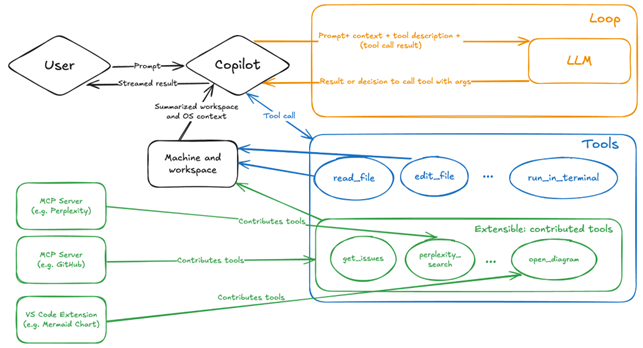
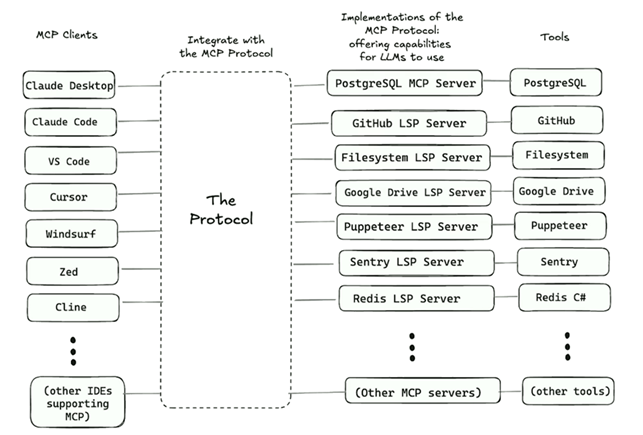
AI coding assistants today: the evolution to an agentic system
AI coding assistants exemplify the transformation from standalone LLM program to so-called agentic systems. Initially framed as standard “autocomplete” tools, agentic systems are evolving into smart pair programmers that collaborate throughout lifecycles.
Framed as AI agents, coding assistants integrate several advanced capabilities:
- Awareness of entire codebases for deeper contextual reasoning
- Planning abilities for scaffolding, edit, sequencing, or refactoring large sections of code
- Execution capabilities within specific development environments
- Feedback loops, which adapt based on runtime errors, developer feedback, or requirements
This transformation has reframed coding assistants from just passive helpers into proactive, efficient copilots. They’re able to perceive more context, planning, executing, and adapting – the features of an agentic system.
The move from standalone LLMs to agentic systems is a paradigm shift in modern-day software engineering. Software developers are no longer interacting with models simply responding – they’re now working alongside AI agents that act.
Large codebases: a challenge
AI assistants are masters at handling small-scale tasks: function refactoring, unit tests, component scaffolding. Their proficiency breaks down when faced with the interconnected complexity of mature, large codebases. LLMs reasoning across monorepo – with its custom tools, technical debt, and architecture – is the real problem. It isn’t about processing more tokens, it’s about us teaching LLM tools to think like senior software engineers: mapping entire systems, planning complex changes, and verifying the outcomes.
The gap between making local edits and reasoning across systems is stemming from several core challenges that cannot be solved by simply increasing the context window size:
- “Needle in a haystack” (specific context vs. attention): a size of one million tokens sounds impressive, but that doesn’t mean the model will find the code that works; without focus, it gets lost in the noise, and a massive prompt can drown the signal and hurt overall accuracy
- “Local dialect” (custom frameworks and DSLs): big codebases grow their own ecosystems over time – internal libraries and patterns form a domain-specific language; LLMs trained on publicly available code won’t know this dialect and struggle to work with it
- The tooling and infrastructure within ecosystems: a codebase is more than its source files – it lives inside systems, CI/CD, permissions, infrastructure-as-code, and dependencies; LLMs can’t run builds, check linters, or debug test failures – even renaming a function can touch several scripts
Advanced systems are adopting code graphs along with structural analysis to represent complex codebases. These systems see code as a complex graph of nodes.
This information allows models to grasp dependencies and perform impact analysis on the potential changes. This method essentially mimics an experienced software developer’s mental model, which allows to reason about relationships within code and make intelligent decisions.
And finally, to ground AI actions in reality, there’s emphasis on integration with external, third-party tools. Through emerging coding standards (for example, Model Context Protocol Servers), AI agents can interact directly with the tools software developers are using every day.
This bridge allows agents to query build systems, get errors from linters, or ask a server for a precise definition. By connecting to this “ground truth”, their operations become significantly more accurate and reliable.
Appendixes to the guide: reference material
Appendix A. AI coding assistants’ evolution
| Phase 1: the local analysis & syntax checker | Early tools were focused on the current file and provided syntax highlighting and basic single-word completions. They could identify errors but couldn’t generate new, multi-line code. |
| Phase 2: generative autocomplete | LLM introduction was a real game-changer. For the first time, these tools could generate boilerplate code, unit tests, and even entire functions from comments and context. |
| Phase 3: conversational assistants | This phase has brought chat interfaces into the IDE directly – software developers could talk to code, asking questions, requesting explanations, and getting plausible suggestions. This way, the tools became context-aware of the private codebase. |
| Phase 4: task-driven agents | This phase has enabled multi-step execution. Beyond generating plain code, the tools became capable of analyzing build features, running tests, applying fixes, and operating with a greater degree of autonomy. |
| Phase 5: autonomous developers | This is the era of cloud-hosted AI agents (for example, GitHub Copilot, OpenAI’s Codex, Google Jules) that function like junior software developers. They perform end-to-end implementation, from writing the code and tests to updating project documentation and submitting pull requests. |
| Phase 6: AI-first workspaces | The next frontier blurs the line between developers and algorithms, thus creating “fluid collaboration”, which includes: Real-time co-pilotingSelf-healing codeCross-repo orchestration This evolution points toward a future where developers can guide creative vision and architecture, while their AI partners manage execution, quality assurance, and maintenance. |
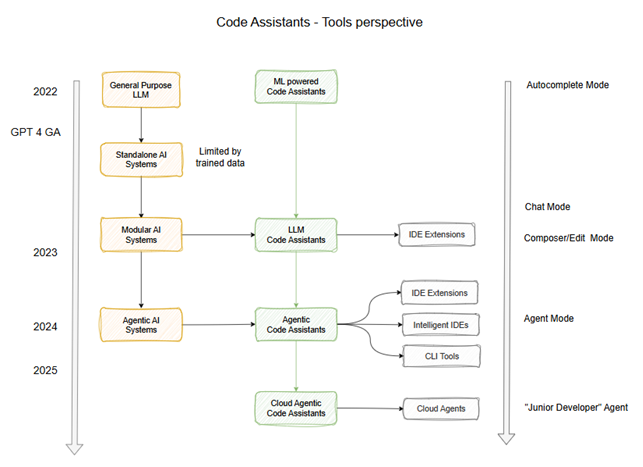
Appendix B. Prompt engineering: key techniques
To obtain the most relevant results from the AI assistant, it’s crucial to write clear and well-structured prompts. Lazy prompts will generate lazy results.
To transform the assistant from a simple tool into a powerful collaborator, you have to write efficient prompts. This section will cover the techniques to learn.
A highly effective method is to break down your request into several key components:
| The elements to include in prompts: | The elements to refine the output: |
| The task – the action to perform The context – the information to consider | The exemplar – an example for guidance The persona – a role to adopt The format – the instructions on layout The tone – the desired writing style |
The diagram below provides a breakdown of this prompt structure and a color-coded example that illustrates how these elements combine to create a comprehensive, effective directive:
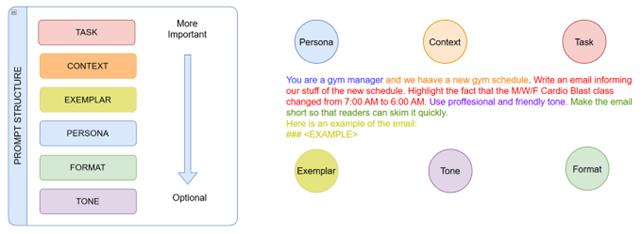
To elevate the quality of future AI-generated results, we will now explore several powerful prompting tactics – you’ll learn to write clear instructions and provide “few-shot” examples to obtain desired results:
- We will also unlock the model’s reasoning capabilities by using the “think step-by-step” instruction
- We will also teach you how to simplify complex instructions by breaking them down into sub-prompts and introduce other strategies to make your interactions with assistants more effective
Key insight: LLM tools need tokens to think; to handle complex tasks, your prompt must either provide tokens (through context and examples) or force the model to generate those itself.
Descriptive instructions
LLMs can’t read minds – the less the model must guess what exactly you want, the more it’s likely to succeed, so be more specific.
For example:
| Bad prompt | Good prompt |
| “Generate good test cases” | “Generate 5 unit tests in Python using Pytest to check if the built function accurately calculates the classic Fibonacci sequence, and include a test for the zero-th index” |
| “Summarize the meeting notes” | “Summarize the meeting notes in a single paragraph. Then write a markdown of speakers and each of their key points. At last, list the next steps the speakers have suggested, if any.” |
| “Explain blockchain to me” | “Act as a high school teacher and explain blockchain to a student using analogies, in under 200 words.” |
Few-shot prompting
If planning to use the model to copy a style of response to queries that’s difficult to describe, provide examples – that’s called few-shot prompting.
For example:
- Q: The odd numbers in this group add up to an even number: 4, 8, 9, 15, 12, 1
- A: The answer is False
- Q: The odd numbers in this group add up to an even number: 17, 10, 19, 8, 12, 24
- A: The answer is True
- Q: The odd numbers in this group add up to an even number: 16, 11, 14, 4, 8, 13
- A: The answer is True
- Q: The odd numbers in this group add up to an even number: 17, 9, 10, 12, 13, 4
- A: The answer is False
Going step-by-step or “chain of thoughts”
LLM tend to make reasoning mistakes when pushed to produce an answer without working through problems. By prompting to use a “chain of thought’ – in essence, to think aloud before giving responses – you encourage more accuracy.
For example:
| Bad prompt | Good prompt |
| “Determine if the solution is correct or not.” | “Work out your solution to the problem below. Then compare your solution to the student’s solution and evaluate if the student’s solution is correct or not. Don’t decide if the student’s solution is correct until creating one yourself. Problem statement: <math task> Students solution: <the solution>” |
The “tree of thoughts”
Instead of just walking straight ahead the maze, you can try exploring your options to see where the paths lead and backtrack if you hit a dead end.
For example: “Imagine three different experts are answering this question. Each expert writes down one step and shares it with the group. Then all the experts move on to the next step. If any of them at any point realizes that they are mistaken, they just step out.”
Meta prompting
Don’t ask the model to do a task, rather ask to think about how it should do it
| Bad prompt | Good prompt |
| “Write a short story about a robot learning to dance.” | “Think step-by-step about how you would write a short story about a robot learning to dance. What would you include? How would you structure the story? Now, begin.” |
Break down complex tasks
First, split the task into subtasks, second, chain them with separate prompts.
For example:
- Prompt 1: “Create a main character who is a detective. Describe personality and background.”
- Prompt 2: “Now, describe the mystery they need to solve. What is the crime, why is it challenging?”
- Prompt 3: “Next, outline the steps the detective will take to solve the mystery.”
- Prompt 4: “Finally, write the story.”

Q&A prompting
Use the interrogative principle: try designing your prompts so that they invite the model to ask extra questions.
For example: “Design a microservices architecture for a fintech platform that handles high traffic. Ask me a set of clarifying yes/no questions – one at a time – about the regulatory requirements, data-consistency needs, latency targets, deployment environment, and other essential details. After gathering enough detail, present a complete proposal (service boundaries, data stores, communication patterns, resiliency strategies). Include a clear reasoning for each listed choice.”
Consensus reasoning
You can also prompt the model to generate multiple diverse reasoning chains and aggregate the answer, thereby achieving greater reliability.
For example: “Design a microservices architecture for a real-time chat application supporting 1 million concurrent users. Generate 5 independent designs (via sampling), then output the architecture that’s most frequently proposed.”
Appendix C. Best practices for using coding assistants
In the following part, we’ll shed some light on the best practices for using coding assistants and agents by using Claude Code as an illustrative example.
1. Start with codebase Q&A
Before approaching code generation or editing, we recommend to begin by asking codebase-related questions. This initial discovery phase will minimize the resources you spend on exploration and boost project onboarding from weeks to days.
Some examples of what to ask:
- “How is @RoutingController.py used in this particular project?”
- “Why did we fix issue #18123 by adding the if/else in the @src/login.ts API?”
- ‘Which was the first app version to include the new @api/ext/PreHooks.php API?”
- “Look at PR #9898, which versions were impacted?”
2. Dive into code generation & editing
Claude operates as an AI agent, which means it can autonomously implement a set of tools to achieve a task. Reading and writing files, performing searches… you do not need to pick the tools – simply explain your goal, and the AI agent will determine a way to achieve it quickly.
First planning, then coding
For the best results, it’s recommended to ask the model to brainstorm or create a plan before writing any code. This ensures the final output aligns with requirements and minimizes manual revisions.
Some examples of what to ask:
- Before writing any code, create a step-by-step plan and ask for approval.
- Propose three different fixes to resolve issue #1234. I will then choose the one to implement.
- Identify the edge cases that are not covered, then update our tests to cover those scenarios.
- Use 3 parallel agents to brainstorm an efficient @services/aggregator/feed_service.cpp clean-up
Efficient workflows
The model is equipped to check the outcomes it provided – it iterates, and that’s what makes the difference. For example, by providing a mockup and asking the model to build an interface, you get fine results, but letting it iterate with feedback, the outcomes often get nearly perfect.
Pattern 1: explore problem – plan – confirm – code – commit
This is the standard, recommended workflow: the agent first understands the task, then proposes a solution, gets approval, and moves to implementation.
For example: “Figure out what’s causing issue #88, suggest fixes, and let me pick the strategy before starting.”
Pattern 2: write tests – commit – code – iterate – commit
The agent first creates the tests, a sort of test-driven software development that creates a definition of “done”.
Prompt example: “Write tests for @utils/markdown.ts to make sure links render properly (note the tests won’t pass yet, since links aren’t implemented). Then commit. Then update the code to make the tests pass smoothly.”
Pattern 3: write code – screenshot – iterate
To handle UI tasks, you can simply provide visual mocks and tools for the AI assistant to “see” its work.
Prompt example: “Implement [mock.png]. Then screenshot with Puppeteer and iterate it until it looks like the provided mock.”
3. The greater the context, the smarter the agent
The greater the context you provide, the smarter and with more precision the assistant will handle the task. The goal is sharing your knowledge.
There are several ways you can do that:
- Instruction files
- Slash commands
- At-mentioning files
- MCP resources
4. The art of collaboration
By sharing slash commands, permissions, memory, and more, you ensure consistent behavior across projects. Config files – claude.commands, CLAUDE.md, claude.settings.json, .mcp.json – can be nicely managed in an hierarchical structure.
For example, to block certain commands at the enterprise level, just add the file where necessary within this hierarchical structure.
5. Master keybindings
To improve your efficiency, you should consider learning and using essential keybindings:
- Shift-tab: Auto-accept edits.
- #: Create a memory.
- !: Enter bash mode.
- @: Add file or folder to context.
- Esc: Cancel operation.
- Double-esc: Jump back in history or resume.
6. Leverage scripting
Claude’s SDK is provided for automating some processes, CI/CD pipelines, and building interactive applications. The SDK allows using the agent as a command-line utility to pipe data in and out for processing and analysis.
7. Multiple sessions to handle complex tasks
Power users can run several sessions in parallel by using multiple checkouts, Git worktrees, or SSH and allow more complex and concurrent coding tasks.
Appendix D. GitHub Copilot quick reference
Major features
- Code completion – autocomplete-style suggestions in your IDE for repetitive code or implementing logic from inline comments
- Copilot Chat – in-IDE chat for questions & answers, triggering tasks with keywords (/fix, @workspace), and generating large sections of code
- Copilot Edits – a chat for making changes across multiple files that offers two modes of operation:
- Edit mode – you define the files GitHub Copilot can modify, provide guidance through context, and approve or reject the edits (best for specific updates with a full control over iterations)
- Agent mode – GitHub Copilot autonomously edits your code, runs commands, and iterates until completing the task (best for multi-step tasks that require error handling or integration)
- Code review & summaries – review suggestions and pull request summaries
- Coding agent – an agent that can be assigned GitHub issues, implement changes, and create pull requests for review
Developer checklist
To begin:
- Pick best-fitting LLM model:
- Faster models are suited for quick coding tasks
- Reasoning models work better for complex planning tasks
- Personalize with instruction files – add custom instruction files for style, naming practices, and more
- Write efficiently – provide context, practice prompting, and use VS tools to improve the outcomes:
- #codebase to auto-locate files
- #fetch to grab content
- Reference files/folders/symbols
- Drag and drop files/folders/tabs into chat
- Add problems, test failures, terminal output
- Include images or screenshots for analysis
- Consider indexing your workspace – see section Codebase indexing
- Choose the right tool – pick mode that meets your needs
- Reuse prompts – save and share most effective prompts with colleagues
What’s more, make use of the provided resources:
- Copilot Spaces – organize content and attachments into spaces that ground Copilot’s responses in the right context
- Knowledge Bases – bring together Markdown docs from repositories (Copilot searches and synthesizes its responses from these)
- MCP Servers – connect to external systems (web services or databases) by using MCP servers
- And other official resources:
Codebase indexing
To augment the capability to understand your codebase, GitHub maintains a code search index for repositories. This index is managed remotely without size limits, so even large projects are covered.
For environments outside it, GitHub creates an index for up to 2,500 code files and ignores non-code assets. For projects that have more than 2,500 files, only those projects within the limit are indexed (to learn in detail, look up the official GitHub reference).
Data security
GitHub Copilot data processing pipeline includes following steps:
- Context gathering – Copilot looks at the file that’s being edited, related code, repo links, and snippets to build clear prompts for the AI model
- Safety checks – each prompt is reviewed via the GitHub proxy to block toxic language, irrelevant input, or hacking
- Model response – Copilot discards data right after use, though chat maintains history for continuity (you can also run your own LLMs on Azure for private and secure deployment)
- Data post-processing – the suggestions are checked for quality, bugs, vulnerabilities, and identifiers (they can be filtered to find public code)
- Final delivery – approved suggestions are displayed in the integrated environment, where developers can choose to accept or reject (the cycle will repeat without storing private information)
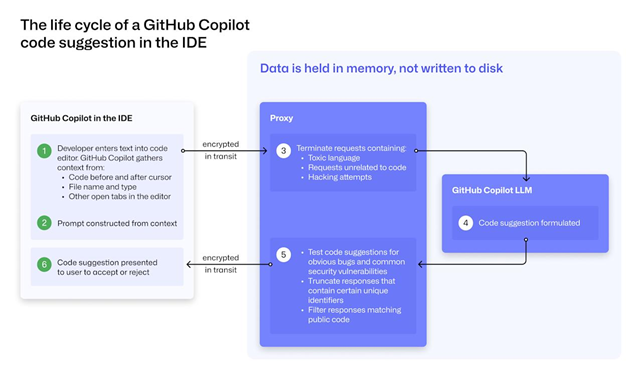
The lifecycle of a GitHub Copilot code suggestion
Official references:
- All about GitHub Copilot data handling
- FAQ in GitHub Copilot Trust Center






 CLUTCH