The 7 Rs of application modernization: how to choose between rehost, replatform, refactor, rearchitect, rebuild, replace and retire

- The 7 R’s framework sorts every legacy system into one of seven paths, from a simple lift-and-shift to a full rebuild or retirement, ordered from least change to most.
- It overlaps with, but is not the same as, the AWS R’s of cloud migration or Gartner’s original five; this guide maps them side by side.
- Choose by constraint: hosting cost → a light-touch move; messy but sound code → refactoring; structure blocks growth → rearchitect; dead-end platform → rebuild; commodity function → replace; low usage → retire.
- Decide per system, often per module. Most real programs combine several paths.
- Big-bang rebuilds carry the most risk; incremental work is safer but slower in calendar time.
- Cost depends on hidden complexity — documentation, test coverage, moving data and parallel running — more than on code size or hourly rates.
- Start with a short portfolio assessment, then release budget in phases tied to measurable outcomes.
Intro
Every legacy application eventually forces the same meeting. Engineering says the platform is holding them back. Finance asks why a rewrite would cost more than the system earned last year. Someone suggests a quick move to the cloud and calling it done.
Each voice is partly right, and that is what makes legacy application modernization hard. There isn’t one move. There are seven, and most portfolios need several at once. The 7 Rs of application modernization turn a shouting match into a structured, system-by-system decision.
The stakes are real. In a McKinsey survey, CIOs estimated that tech debt amounts to 20–40% of the value of their entire technology estate before depreciation. Pick the wrong path and you either carry that debt onto a new server or spend years rewriting the application when a few months of cleanup could have fixed it.
This guide explains each option, untangles the Gartner and AWS versions you will meet elsewhere, and gives you decision criteria to find the right modernization path, plus costs, team roles and a phased plan.
What are the 7 R’s of application modernization?
The seven Rs are seven ways to treat an aging system — rehost, replatform, refactor, rearchitect, rebuild, replace and retire — ordered from the least change to the most, so each item in your application portfolio can be matched to the cheapest path that removes its real constraint.
Think of it as a menu of application modernization strategies, not a methodology. It doesn’t tell you how to write code. It tells you how much code to touch.
The seven options in plain English
- Rehost (“lift and shift”). This path moves an application to new infrastructure, usually a public cloud, without changing its code. Fastest and cheapest, but every architectural limitation travels with it. AWS Application Migration Service, for example, automates moving server workloads to cloud instances.
- Replatform (“lift, tinker and shift”). Move the system and make targeted changes on the way: swap a self-managed database for a managed cloud service, containerize, upgrade the runtime. The aim is to take advantage of cloud capabilities and gain cloud benefits without touching the business logic.
- Refactor. Restructure the existing application code without changing what it does: remove duplication, add tests, split bloated modules, upgrade libraries. The system stays in production throughout.
- Rearchitect. This path restructures the application itself, often turning a monolithic application into services or an event-driven design. Much of the logic is reused, but its shape changes.
- Rebuild. Bring the application to a new stack by writing it again from scratch, keeping its scope and requirements but discarding the old code. This is where the “rewrite legacy code” debate lives.
- Replace. Retire the custom system and adopt a commercial off-the-shelf (COTS) product, its cloud version, or a software-as-a-service (SaaS) platform, then move the data and processes across.
- Retire. Switch the system off, archive the records you must keep, and redirect users to whatever already covers the need. Planned application retirement is the only path that lowers cost on day one.
How the list evolved: from Gartner’s 5 Rs to AWS’s seven
You will see at least three “R” lists online, and they don’t line up neatly. The idea started with Gartner, which introduced a five-option model in 2010: rehost, refactor, revise, rebuild and replace. AWS expanded it into six migration strategies, the 6 Rs, and later added a seventh option for workloads running on VMware Cloud. Today, AWS Prescriptive Guidance describes its 7 strategies as building on the seven options Gartner identified in 2019.
| Framework | Options | What’s distinctive | Lens |
| Gartner, 2010 | Five | Includes “revise,” a code fix before a move | Moving apps off premises |
| AWS, first version | Six | Adds retire and retain; calls replace “repurchase” | Planning a portfolio move |
| AWS today | Seven | Adds relocate for VMware estates | AWS cloud migration at scale |
| Gartner, 2019 | Seven | Adds encapsulate; splits refactor from rearchitect | Changing the software itself |
| This guide | Seven | Keeps retire; drops the other extras | Whole-portfolio decisions |
Some names mean different things in different lists. AWS’s “repurchase” is everyone else’s “replace.” AWS groups refactoring with rearchitecting, while Gartner separates them. And Gartner’s original “refactor” was closer to what most teams now call replatforming.
What about retain, relocate and encapsulate?
In AWS’s list, the extra Rs are retire, retain and relocate.
Retain is a deliberate “not now,” and it should always carry a review date.
Relocate shifts whole virtual machines between hypervisors or clouds and is purely an infrastructure call.
Encapsulate, from Gartner’s list, wraps old functions in APIs, which is usually a tactic inside a larger change rather than a destination of its own.
This guide keeps retire because switching systems off is one of the fastest ways to free budget for the rest.
Moving vs. modernizing: which lens are you using?
The cloud lens asks how to get workloads to the cloud. The modernization lens asks what each system should become. The first is about hosting and migration planning. The second is about code, application architecture and ownership. If your problem is a data center lease, a hosting plan is enough. If nobody can ship a feature in under three months, you need to modernize the software itself.
When to choose each path: five self-diagnosis scenarios
Start from the constraint, not the technology. Ask what actually stops a system from serving the business, then pick the smallest change that removes that constraint. Score each major module separately; the billing engine and the reporting layer rarely need the same answer.
Scenario 1: The software works, but where it runs doesn’t → rehost or replatform
Your lease is ending, hardware is out of warranty, or you want to shift on-premises infrastructure to the cloud before the next renewal. The code itself is fine. Lift and shift when you must migrate to the cloud by a fixed, close date. Replatforming makes sense when you can afford a few extra weeks to adopt managed databases, containers or autoscaling, because that is where most of the cloud benefits like elastic scaling and lower operations effort come from. Be careful with pure rehosting, though: moving inefficiency onto a cloud platform simply moves the bill. And if some workloads must stay local for latency or regulation, a hybrid cloud migration keeps them on premises while the rest move.
Scenario 2: Every release is slow, but the design still fits → refactor
The data model makes sense, the framework is supported and performance is acceptable. Yet a small change touches ten files and breaks two others. Defects cluster in a handful of modules, and engineers can still explain how the core works. This is refactoring territory: you keep years of embedded rules for each business process and improve application delivery speed without a feature freeze.
Scenario 3: The architecture can’t keep up with growth → rearchitect
The system ships as one unit, so every team waits on every other team. One busy feature forces you to scale everything. You need real-time processing, multi-tenancy or a new integration model the current structure resists. Rearchitecting changes the shape of the system, usually step by step behind an API layer, often toward a cloud-native design built for the cloud to take advantage of autoscaling, while reusing the logic that still works.
Scenario 4: The platform itself is a dead end → rebuild
This is the clearest answer to when to rewrite software. The language or runtime is unsupported, security patches have stopped, and hiring engineers for it is close to impossible. VB6 programs and systems pinned to .NET Framework 4.8 are typical examples; our breakdown of whether to move or rearchitect .NET Framework 4.8 apps walks through that exact call. When you rewrite legacy code, do it in slices rather than one big-bang release.
Scenario 5: It does commodity work — or nobody uses it → replace or retire
HR, ticketing, basic CRM and accounting tools built in-house a decade ago rarely differentiate you now. If a mature SaaS product covers most of the workflow, replace it. Then check usage logs: systems with a handful of active users, or functions duplicated elsewhere, are candidates to retire.
Quick reference
| If this is your main constraint… | Start with | Watch out for |
| Hosting cost or a lease exit | Lift-and-shift or platform update | Carrying inefficiency into the cloud |
| Slow, risky changes in sound code | Refactor | Polishing a platform that is end-of-life |
| Structure blocks scale or team autonomy | Rearchitect | Splitting into services too early |
| Unsupported language or runtime | Rebuild | Big-bang cutovers and lost rules |
| Commodity function | Replace | Vendor lock-in and customization creep |
| Low usage or duplicated function | Retire | Record-retention and audit obligations |
Benefits of using the framework
The framework pays off before a single line of code changes. Its main value is forcing a separate, defensible decision for every application instead of one blanket plan.
1. Budget follows business value
Without a framework, upkeep quietly absorbs the budget. The U.S. Government Accountability Office (GAO) found that federal agencies spent about 75% of their IT budget on operations and maintenance in fiscal year 2015, leaving little for improvement. Sorting systems by path exposes which ones deserve investment and which should simply be kept running, replaced or switched off.
2. Engineering time comes back
Legacy pain is mostly a time problem. Stripe’s Developer Coefficient survey found the average developer spends 17.3 hours a week on technical debt and bad code, roughly 42% of the working week. Targeted cleanup of the right modules recovers part of that capacity for new features.
3. Cloud costs become a choice, not a surprise
In many cloud migration projects, lifting everything as-is is the quickest move, but it often shifts waste into a monthly invoice. Cloud computing rewards systems built to scale down as well as up. In Flexera’s 2025 State of the Cloud report, 84% of respondents named managing cloud spend as their top cloud challenge. Choosing deeper changes for the heaviest workloads, and retirement for idle ones, keeps cloud resources tied to real usage.
4. A smaller security attack surface
Unsupported runtimes stop receiving patches, and every forgotten system is another door left open. IBM’s 2025 Cost of a Data Breach report puts the global average cost of a breach at $4.44 million, and more than double that in the U.S. Switching off unused systems and moving the rest onto supported platforms shrinks that exposure and eases compliance.
5. Programs that actually finish
Big, undifferentiated modernization programs stall. McKinsey found that companies in the bottom fifth for managing tech debt are 40% more likely to see IT modernizations left incomplete or canceled, while the top fifth grow revenue about 20% faster. Assigning a path per system breaks one risky bet into many smaller, measurable ones.
Replace vs. modernize vs. rewrite: an honest comparison
No path is free. The useful question is which trade-off you can live with. Below, the app modernization approach Abto Software usually recommends, incremental change that mixes replatforming, refactoring and selective rearchitecting, sits next to the three alternatives teams most often consider.
| Lift and shift only | Incremental change | Big-bang rebuild | Buy a SaaS or COTS product | |
| Typical time to first value | Weeks | 1–3 months | Only at cutover | 1–3 months |
| Business disruption | Low | Low to medium | High at cutover | Medium (process change) |
| Fixes architectural limits | No | Yes, gradually | Yes | Only if the product does |
| Keeps custom business logic | Yes, unchanged | Yes, improved | Yes, if rediscovered | Only what the new application supports |
| Long-term ownership | Full | Full | Full | Vendor roadmap |
Lift and shift only: fast, but it postpones the real decision
A plain move gets you out of a data center quickly and with little risk. The trade-off: you pay cloud prices for a system never designed for elastic cloud infrastructure, without being able to take advantage of cloud benefits such as autoscaling, and the code problems are still there next year.
Big-bang rebuild: a clean slate with concentrated risk
A full rewrite gives you new code, a current stack and no inherited shortcuts. The trade-off: reaching feature parity always takes longer than planned, because years of undocumented edge cases have to be rediscovered while the old system still needs maintaining. It can work for small systems with stable, well-specified scope.
Replace: speed in exchange for control
Buying a mature product is often the fastest way to exit a commodity system. The trade-off: you inherit the vendor’s data model, pricing and roadmap. Customization beyond configuration erodes the savings, and leaving later can be expensive. Replace vs. modernize is really a question of ownership: keep and improve what makes you different, buy what doesn’t.
Incremental change: lowest risk, but not the fastest
This is our default recommendation for business-critical, mid-size systems, because value arrives in slices and every step can be reversed. The honest limitation: this migration approach is not the shortest path in calendar time. You run old and new components side by side for months, pay for both, and need disciplined integration work at every seam. If you face a hard regulatory deadline six months away, a narrower move or a replacement may serve you better. For a deeper look at the rewrite question, see our guide to refactor vs. rewrite vs. replace for a legacy application.
Who’s involved: roles and team model
Modernization projects fail more often from missing people than from missing code. Who you need depends on the path: a lift-and-shift is mostly an infrastructure job, while a rebuild needs people who understand the business as well as the stack.
| Role | What they own | Most critical for |
| Executive sponsor | Budget, priorities, risk appetite | Every path, especially rebuild and replace |
| CTO or head of engineering | Final technical call and sequencing | Every path |
| Product owner | What to keep, drop or rebuild | Rebuild, replace, retire |
| Domain experts (finance, operations, clinical) | Undocumented business rules | Code-level paths and replacement |
| Solution architect | Target design and integration seams | Platform changes and rearchitecting |
| Senior engineers (old and new stack) | Code archaeology and translation | Code-level paths |
| QA automation engineer | Regression safety net | Code-level paths |
| DevOps engineer with cloud expertise | Pipelines, environments, cost controls | Hosting moves and rearchitecting |
| Data engineer | Moving, archiving and reconciling records | Rebuild, replace, retire |
How the team scales by path
- Hosting moves: a cloud architect, one or two DevOps engineers and a tester can move a mid-size system in weeks.
- Code-level work: a solution architect, a business analyst, three to six senior engineers and a QA automation engineer, working alongside your product team.
- Rebuild: the same team plus deeper domain-expert time and dedicated capacity for data migration.
- Replace and retire: a smaller technical team, but more change management, data mapping and vendor coordination.
If your team lacks some of these skills, outside migration assistance can fill the gaps for the duration of the program. AI coding assistants now speed up code analysis, documentation and translation between languages. They don’t remove the need for experienced reviewers: code that compiles is not the same as code that preserves business logic, so a senior developer still checks every change.
How to apply the framework: a phased plan
Treat the plan as a series of small, reversible commitments. Each phase ends with a decision gate, so budget is released against evidence rather than promises.
Phase 1 — Inventory the portfolio (2–4 weeks)
- List each system, its owner, users, integrations, data stores and runtime versions.
- Pull usage data. Systems nobody opens are your first candidates to retire.
- Record the pain: lead time for changes, incident history, hosting cost, end-of-support dates.
- Interview domain experts to surface rules that live only in code or in people’s heads.
Phase 2 — Assign a path to each system
- Score each system on two axes: business value and technical health.
- Use the grid below as a starting point, then adjust for deadlines, compliance and skills.
- Sequence the work into a migration path: quick wins first to free budget, strategic rebuilds later.
- Attach a cost range and a success metric to each item. Our legacy system modernization strategy covers this step in more depth.
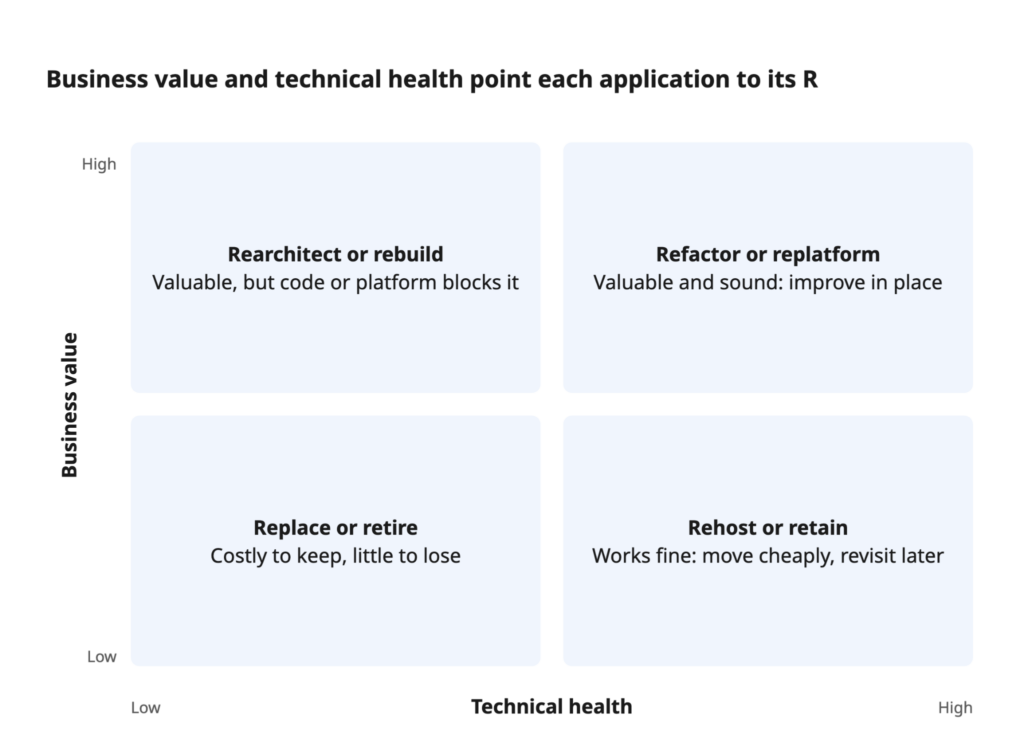
High-value systems earn investment in their code; low-value ones should cost as little as possible to keep — or be switched off.
Phase 3 — Build the safety net
- Before the migration process starts, add characterization tests that record what the current system does today, right or wrong.
- Set up continuous integration and delivery (CI/CD), environments and monitoring.
- Put an API or routing layer in front of the old core so traffic can shift module by module.
Phase 4 — Execute in waves
- Start with a module that is valuable but low-risk, to prove the approach.
- Migrate the application in slices, running old and new side by side and comparing outputs before switching traffic.
- Migrate data incrementally, with reconciliation checks at every step.
- Release every two to four weeks and review scope and budget at each gate.
Phase 5 — Retire, then optimize
- Decommission old components once traffic and records have fully moved.
- Right-size capacity based on real usage, not launch-day estimates.
- Update documentation, runbooks and ownership.
For a concrete example, see how we upgraded an EEG application to .NET 8 while it stayed in clinical use.
How much does each path cost?
The cost of each path depends less on lines of code than on how much hidden complexity it forces you to confront: undocumented business rules, missing tests, tangled integrations and records that must move without loss.
Relative cost and effort
| Path | Relative upfront cost | Typical duration for a mid-size system | Where the money goes |
| Retire | Lowest | Weeks | Archiving, dependency checks |
| Rehost | Low | Weeks to a few months | Tooling, testing, setup |
| Replatform | Low to medium | A few months | Managed services, runtime upgrades, testing |
| Replace | Medium | 3–9 months | Licenses or subscriptions, configuration, moving records, training |
| Refactor | Medium, spread over time | Ongoing, value within weeks | Senior engineering time, test automation |
| Rearchitect | High | 6–18 months | Design, engineering, parallel running |
| Rebuild | Highest | 9–24 months | Full engineering team, discovery, moving records |
These are directional ranges, not quotes. Two systems of the same size can differ several-fold in cost depending on test coverage and documentation.
What drives the price within each path
- Knowledge gaps. Missing documentation and departed authors mean paid discovery time.
- Test coverage. Low coverage adds a safety-net phase before any real change.
- Moving records. Schema changes, cleansing and reconciliation are the most underestimated line item.
- Parallel running. The longer old and new coexist, the longer you pay for both.
- Regulation. Healthcare, finance and other regulated sectors add validation and audit work.
- Ongoing run costs. Migration costs are only part of the bill: a plain lift can raise monthly hosting fees; a purchase adds subscription growth over time.
How geography and team model affect the budget
Rates vary widely by region. Engineering teams in Central and Eastern Europe typically cost well below U.S. or Western European onshore rates, with overlapping time zones for Europe and partial overlap with the U.S. East Coast. A common setup is onshore product ownership combined with a dedicated offshore engineering team. For a fuller breakdown, see our guide on how much legacy system modernization costs.
An honest caveat
Cheaper isn’t automatically worse, and expensive isn’t automatically safer. A lower-rate team with deep experience in older stacks and a strong testing culture often finishes sooner than a premium team learning your domain from scratch. Compare proposals on three-year total cost of ownership, the realism of the parity estimate and how risk is staged, not on the hourly rate alone.
Making the change stick: best practices
Finishing the move is the midpoint. Without a few standing habits, today’s new system becomes the next decade’s problem.
Revisit each system’s path once a year
Modernization decisions are made for current conditions; they are not permanent labels. A retained system reaches end of support; a purchased tool raises its prices; a lifted workload grows into a cost problem. Review the portfolio annually, alongside budget planning, and reassign systems when the facts change. Give every “retain” a review date so it doesn’t quietly turn into neglect.
Pay down tech debt continuously, not in crises
Reserve a fixed share of every sprint for small cleanups and upgrades, and track debt in a visible register with an estimated cost of delay. It works: McKinsey quotes one CIO who cut the share of engineer time spent on the tech debt “tax” from 75% to 25% by managing debt deliberately. Upgrade frameworks and runtimes on a schedule rather than waiting for end-of-support notices.
Report outcomes the business recognizes
Agree on three to five metrics before work starts: deployment frequency, lead time for changes, incident rate, hosting cost and time-to-market for new features are common choices. Report them at every phase gate. Numbers keep funding stable when priorities shift, and they show early when a wave should be re-scoped.
Conclusion
Application modernization is rarely one decision. It is a portfolio of smaller ones, and the seven paths give each of them a name, a cost profile and a clear trade-off. Teams that match every system to the lightest change that removes its constraint spend less, finish more often and keep ownership of the software that sets them apart.
If you’d like an outside view on which path fits each of your systems, get in touch with Abto Software — we’ll help you map the sequence before you commit the budget.
FAQ
No. The best-known version comes from AWS migration guidance and is framed around hosting, but the same logic applies on premises. You can clean up a desktop program, rebuild a web portal or retire an internal tool without touching a cloud provider. Cloud adoption is often the trigger, not the requirement.
Lift-and-shift moves and retirements usually come first, because they are quick and release budget for harder work. Code-level changes tend to follow in later waves, once the portfolio is mapped and the team has proven its delivery approach on lower-risk systems.
Yes, and most large systems should. A common pattern is to lift the whole system off its old servers, swap a commodity module such as invoicing for a subscription product, and then clean up or restructure the core over the following year. Assigning paths per module, not per system, usually gives better results.
Look at the foundation, not the code quality. If the language or runtime is unsupported, the data model fights every new requirement, or hiring for the stack has become impractical, a rebuild is justified. If the architecture still fits and the pain is mainly messy code, incremental cleanup is cheaper and safer.
Not always. Subscription fees grow with users, customization beyond configuration adds cost, and leaving later can be expensive. Buying tends to win for commodity functions. For systems that encode how you compete, upgrading your own software usually costs less over a three- to five-year horizon.
Rehosting lifts an application to the cloud largely as-is, typically from physical or virtual servers to cloud instances. Relocating, an AWS-specific option, shifts whole virtual machines at the hypervisor level, for example VMware estates, without changing the operating model. That is an infrastructure decision; a lift-and-shift can be the first step of a longer program.






 CLUTCH