A dual-setup ERP migration from desktop to cloud

ERP modernization: VB6 to .NET migration
Industry:

Project summary

We ran both old and new ERP systems in parallel to migrate the modules without downtime and disruption. The results: faster rollout of updates, fewer issues, greater stability, better performance no matter the loads – a future-ready ERP platform.

An incremental ERP rollout can lower immediate costs by 30–50% if compared to a full rewrite.

Services:

Legacy code migration
Legacy code refactoring
Software modernization
CRM development
UI/UX design
Payment handling
1

Project overview

We assisted a mature retail enterprise that struggled with maintaining an outdated, VB6 coded ERP software. It restrained any further business growth, but with 100+ clients, a complete ERP rewrite was out of question – we aimed to avoid potential downtime. 

Our strategy: to run both versions (the old & new ERP systems) in sync while migrating one part after another. The outcome: a robust ERP platform that’s primed to support long-term plans and unlock profit margins.

2

Main goals

We run both versions in parallel to achieve an almost seamless transition, which included:

  • Modernizing the ERP system without disruption & downtime
  • Migrating module after module to ensure each part works correctly before switchover
  • Keeping costs under control by avoiding a complete ERP replacement at once
  • Validating modules in real-world business conditions while preserving critical functionality
  • Allowing fallback to the old version for specific business processes if any issues arise in the new one
  • Allowing employees and clients to adapt to the new platform without resistance & bottlenecks
3

The problem

The client’s ERP software was desktop-only, which meant the users couldn’t access it whenever they needed. While competitors were moving to modern, cross-platform systems, the company was greatly falling behind, thus losing business opportunities and revenue on the retail market.


A full ERP rewrite would have taken years, and having 100+ clients, that wasn’t an option to consider.

4

The solution

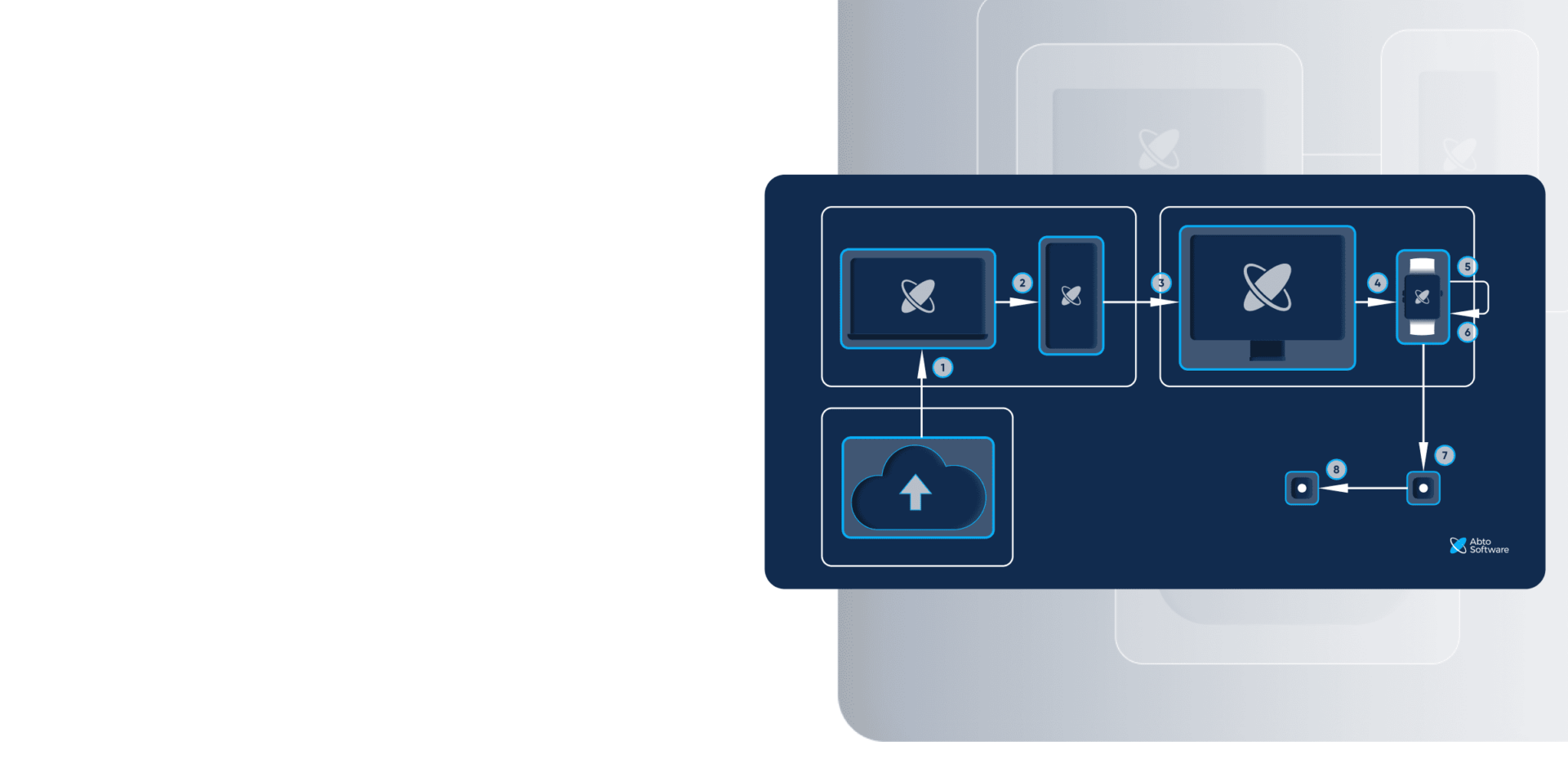
Our dual-setup project strategy was implemented to transition one module after another without disruptions. While the legacy system was supported to store and manage critical functions and data, we started to migrate and build out the new system by porting existing modules and adding more functionality.

  • Both systems were synchronized and operational, so users could work without interruption.
  • This approach has allowed instant improvement 

Why run two systems in parallel?

  • Zero disruption & downtime: no interruption to operations
  • Less risk: any issues are isolated within modules
  • Controlled costs: the expenses are spread over time – no large upfront investment
  • Proven reliability: the modules are tested in real-world business scenarios before rollout
  • Greater safety: the system remains available for fallback if needed
  • Gradual adoption: the users can transition in their own pace, so there’s less resistance to change

Microservices architecture

The optimal next step, naturally, would be moving to a microservices architecture for flexibility & scalability. The problem: this requires a more complex infrastructure, thus more resources too.


But for this client, we’ll implement microservices architecture in just three months – we divided the modules into separate services already.

5

Main challenges

Complex features with heavy legacy logic

One challenge was migrating certain features – for example, some features were backed by thousands of lines. The process thus required deeper analysis, an understanding of context and dependencies, as well as planning to ensure the functionality stayed intact.


What’s more, our goals also included:

  • Reusing the existing database
  • Introducing a public API
  • Stay high-performing despite thousands of end-users
  • Stay stable and secure despite lower maintenance costs

Outdated logic and poorly documented bugs

Another challenge was the inherited logic from the 30-year-old system, mostly scattered and undocumented. We couldn’t risk migrating existing errors.


In brief:

  • We had to validate the functionality and decide on rewriting vs. preserving
  • Where possible, we reimagined specific features – for example, we redesigned 12 menus into intuitive 5 sections, which preserve key functionality without adding extra complexity
6

Our contribution

The modules

We migrated:

  • Sales processing
  • Purchase processing
  • Finance
  • Accounting
  • Installations management
  • Sales reporting
  • Inventory management
  • Warehouse management
  • Cash reconciliation
  • Deposit reconciliation
  • Apartment module
  • Property management

And added:

  • Installation scheduling
  • And a dealer portal

Our strategy


1. Project discovery

We assessed and analyzed the legacy ERP software to understand its complexity and identify the priorities.


2. Team setup

We defined clear roles and responsibilities to deliver the project within deadlines and budget.


3. VB6 to .NET migration

Moving further, we handled VB6 migration, which involved:

  • Meticulous investigation and planning
  • Environment setup
  • Visual Basic 6.0 translation
  • Visual Basic 6 refactoring and optimization

4. New architecture

Done with VB6 migration, we built a modern, scalable architecture to support the client’s long-term strategy.


5. First migration

We started the initial ERP migration by transferring top-priority features to avoid disrupting operations.


6. ERP modernization

We implemented new functionality, which included executive dashboards for better ERP experience.


7. Final migration

We moved the remaining, less-critical modules.


8. Thorough testing

We performed careful validation all throughout every stage to eliminate potential breakdowns and disruption – data corruption, performance deterioration, compatibility-related issues, security vulnerabilities, and more.

Tools and technologies

Backend & frontend stack:

  • .NET
  • ASP.NET MVC
  • C#
  • CSS
  • HTML
  • EntityFramework
  • Javascript
  • TypeScript

Libraries & third-party tools:

  • Bootstrap
  • jQuery

Project timeline

  • February 2018 – ongoing

Team composition

  • At the project's beginning:
  • 20+ software developers
  • 1 business analyst
  • 2 QA engineers
  • 1 UI/UX designer
  • To date:
  • 4 software developers
  • 2 QA engineers
7

Value delivered to business

After migration, the end-users can access the system from anywhere and anytime from smartphone or tablet. And that without risking session disruption (for example, after new Microsoft rollouts).


Our client now enjoys:

  • Simple rollout of updates & features
  • Fewer issues, cheaper maintenance
  • Higher stability during upgrades
  • Higher performance even with growing load

Although the current setup remains hybrid, the client is planning to abandon the desktop version completely.


In the next stages, we’re planning on integrating:

  • A new payment gateway
  • QuickBooks for accounting operations
    – Our system will provide all basic ERP functionality
    – And serve as the main source for extracting accounting information
  • MeasureSquare for flowing estimation
  • PlanSwift for construction takeoff

FAQ

Why is a desktop-only ERP system considered outdated?

Among many other downsides, which brought us to ERP data migration to the cloud:

  • Limited accessibility – your users must work from machines where the legacy software is installed
  • Higher risk of downtime – any updates can break the system
  • Difficult integration – poor compatibility with APIs, third-party tools, and modern cloud platforms
  • Expensive maintenance – fewer engineers with the required expertise

What are the benefits of an ERP migration to cloud?

For end-users, this means increased availability across devices – staying desktop-only is already too outdated. For leaders, this provides quicker changes, cheaper support, higher stability, and performance even gaining more users.

Why not write an ERP system from scratch?

With that many clients (100+ companies), it made no sense to write enterprise-level software from scratch. With such data volumes, the undergoing would have been unjustified.

That’s why we went for strategic ERP to cloud migration.


Why not partially automate ERP migration to deliver faster results?

Back when the project has been first initiated, there were no programs to automate the process even partially. Even today, having more modern assistants, you can accurately automate only small code chunks – a migration is more than finding appropriate equivalents.

The answer – ERP to cloud migration, carefully performed by professionals.

Categories:

Unlock full ERP potential

Contact us

Tell your idea, request a quote or ask us a question